Best Audiobook Apps for Students 2026: Study Smarter

Best Audiobook Apps for Students 2026 should make study material easier to access, not simply offer a large book catalogue. Students may need published audiobooks, textbooks, PDFs, lecture notes, or scanned pages. The right app should match that material while giving useful control over speed, navigation, offline listening, and review.
What Makes a Good Audiobook App for Students?
A good student audiobook app fits real academic routines. It should be easy to start, comfortable for longer listening, and practical when a student needs to return to a specific chapter or idea. Voice quality matters, but it is only one part of the experience.
Students often switch between novels, textbooks, research papers, lecture notes, and assignments. An app that works well for entertainment may not handle personal study material. That is why file support, navigation, playback speed, and offline access deserve as much attention as the size of a catalogue.
Cost also matters. Before paying for a subscription, students should decide whether they mainly want access to published audiobooks or need a tool that can turn their own documents into audio.
Audiobook Library Apps vs AI Reading Apps for Students
Audiobook library apps and AI reading apps solve different problems. A library app gives access to books that have already been recorded. It is useful when the exact title a student wants is available in the catalogue.
An AI audiobook or text-to-speech tool works with material the student already has. That can include a PDF, EPUB, notes, an essay draft, or text extracted from a scanned page. Instead of searching for an existing recording, the student creates a listening version of the source.
This distinction is important. A literature student may want professionally produced novels, while another student may need a 40-page course reading converted before tomorrow. The best choice depends on the task rather than the label “audiobook app.”
What Features Matter Most for Students?
Students should judge features by how much friction they remove from studying. A polished interface is helpful, but the app still needs to handle the material, keep the listener oriented, and make review easy.
PDF and EPUB support for course readings, ebooks, and digital textbooks.
Clear AI narration or text-to-speech that remains comfortable during longer sessions.
Adjustable playback speed for revision, difficult concepts, and familiar material.
Bookmarks and chapter navigation for saving definitions, exam topics, and important passages.
OCR when printed pages or image-based documents need to become readable text first.
Offline audiobooks or downloadable audio for commutes, travel, and unreliable internet.
Simple progress controls so a student can stop and return without losing the study position.
PDF and EPUB Support
PDF support is valuable because many lectures, readings, reports, and papers are shared in that format. EPUB support is useful for digital books because the text structure is usually cleaner and easier to divide into chapters.
Natural Narration
Natural narration can reduce listening fatigue, especially during a long chapter. For study material, clarity is usually more important than dramatic performance. The voice should pronounce ordinary text consistently and keep a steady pace.
Playback Speed
Playback speed lets students adapt audio to the difficulty of the material. A familiar revision chapter may be comfortable at a faster pace, while a new theory or technical definition may need slower listening and replay.
Bookmarks and Chapter Navigation
Bookmarks help students save important sections without writing down a timestamp. Chapter navigation makes it easier to move between topics, return to a lecture reading, or review one section before an exam.
OCR for Printed Material
OCR, or optical character recognition, converts text in a scan or photograph into machine-readable words. Once the text is extracted, an audiobook generator can narrate it.
OCR is useful for printed textbooks and handouts, but it can make mistakes when pages are blurry, curved, damaged, or arranged in complex columns. Important material should be checked against the source.
Can Students Turn Textbooks Into Audiobooks?
Yes, when the textbook is available in a supported digital format or its printed text can be extracted with OCR. A digital textbook may be converted directly, while a physical page usually needs scanning before it can become textbook to audio.
Textbooks require more care than novels because they often contain tables, formulas, diagrams, captions, and references. Audio can carry the main prose, but visual material should remain open when layout is part of the meaning.
Hoowooh can support a book-to-audio workflow for supported digital files and scanned material. This gives students another way to listen to reading assignments without pretending that every visual element can be replaced by speech.
What Makes an Audiobook App Good for PDFs?
A useful PDF to audiobook workflow should first get the reading order right. Multi-column pages, footnotes, headers, and page numbers can make basic extraction sound confusing. A short test from the middle of the document can reveal these problems before a full conversion.
Navigation matters too. Students may need to return to one heading rather than replay a large section. If the document is long, chapter or section breaks make the audio easier to use for revision.
For research papers, keep the original PDF nearby. Citations, figures, tables, and equations often make more sense visually even when the surrounding explanation is easy to hear.
How Can Students Listen to Printed Textbooks?
Printed pages need to become digital text before AI narration can read them. The usual path is scan, OCR, review, and then audio generation. Good lighting, flat pages, and clear images improve recognition.
Why Offline Listening Matters for Students
Offline listening is useful on buses, trains, flights, campus walks, and places where Wi-Fi is weak. It also prevents a study session from depending on a live connection.
Hoowooh can produce audio that can be saved for later listening, making it practical to prepare material in advance and use it away from a connection.
How Playback Speed Changes the Way Students Study
Speed control can turn one audio file into several study modes. A first listen may use a normal pace. A revision pass can be faster. A difficult section can be slowed down and replayed until the idea is clear.
Students should not treat faster listening as automatically better. If the mind keeps drifting or key details are missed, the speed is too high for that material. Comprehension matters more than finishing quickly.
Why Bookmarks and Chapter Navigation Matter for Study
Studying is rarely a straight journey from page one to the final page. Students jump between topics, compare chapters, revisit definitions, and return to material that may appear on an exam.
Bookmarks make those return points easy to save. Chapter navigation provides a larger structure, while seeking controls help with smaller movements inside a section. Together, they make long audio more useful as study material.
Best Audiobook App Features by Student Need
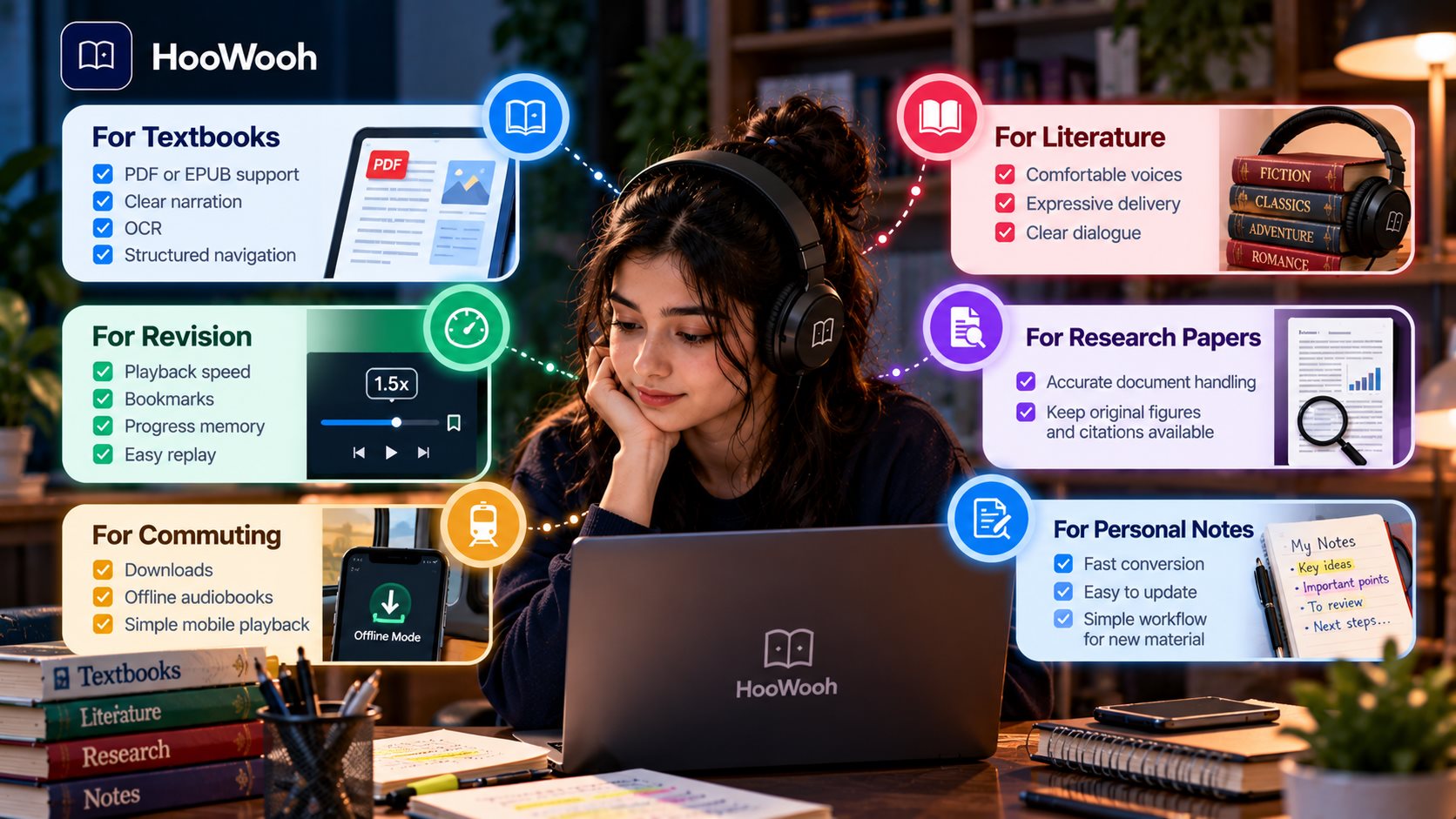
The meaning of “best” changes with the study task. A student should choose the features that solve the main problem rather than paying for every possible option.
For textbooks: prioritise PDF or EPUB support, clear narration, OCR, and structured navigation.
For revision: prioritise playback speed, bookmarks, progress memory, and easy replay.
For commuting: prioritise downloads, offline audiobooks, and simple mobile playback.
For literature: prioritise comfortable voices, expressive delivery, and clear dialogue.
For research papers: prioritise accurate document handling and keep the original figures and citations available.
For personal notes: prioritise fast conversion and a workflow that makes updated material easy to regenerate.
Free vs Paid Audiobook Apps for Students
Free audiobook apps can be useful when a student mainly needs public or limited content. Free AI reading tools may also work for short passages. The limits become more noticeable when the student needs long textbooks, frequent conversions, better voices, or offline exports.
Paid plans may offer higher usage limits, more file support, faster processing, better narration, or extra controls. Before subscribing, compare those features with the amount of material you actually expect to use each month.
Audiobook Apps vs Text-to-Speech Tools
Traditional audiobook apps focus on playing finished recordings. Text-to-speech tools create speech from written text. Modern AI audiobook tools can sit between the two by turning documents into more natural, structured narration.
For students, the difference matters because many academic readings will never appear in a commercial audiobook catalogue. A flexible audiobook generator can create audio from the material the student already needs to study.
Can Students Use Audio for Proofreading Assignments?
Yes. Listening to an essay or report can reveal problems that are easy to miss during silent reading. A repeated word may suddenly sound obvious. A sentence that looked acceptable may feel too long when heard aloud.
Audio can also expose missing words, awkward transitions, and places where an argument becomes hard to follow. After listening, students should still check spelling, punctuation, citations, names, and formatting visually.
When Should Students Keep the Original Text Open?
Audio works best when the meaning is carried mainly by words. Keep the original source open when a page contains equations, charts, maps, code, chemical structures, tables, diagrams, or detailed citations.
The same applies to unfamiliar terminology. Hearing a new term can help with flow, but seeing the spelling may be important for notes and exams.
Can Audiobooks Help Students Study More Efficiently?
Audiobooks can make study time more flexible because reading material can be reviewed while walking, travelling, or resting the eyes. They can also provide another way into dense material when silent reading feels slow.
Efficiency still depends on attention. Passive listening may be useful for familiar content, but new academic material often needs pauses, notes, repetition, or visual checks. Students should match the listening method to the difficulty of the task.
How to Test an Audiobook App Before Paying
Test an app with real study material rather than a polished sample. One chapter is usually enough to expose the most important strengths and weaknesses.
Upload or open one real PDF, EPUB, textbook chapter, or set of study notes.
Check whether headings, paragraphs, and page content appear in the correct order.
Try normal, faster, and slower playback speeds and listen for clarity.
Save a bookmark and confirm that returning to the same point is easy.
Test a difficult name, technical term, or abbreviation for pronunciation.
If offline use matters, verify that the finished audio is available without an internet connection.
How to Choose the Best Audiobook App for Your Study Routine
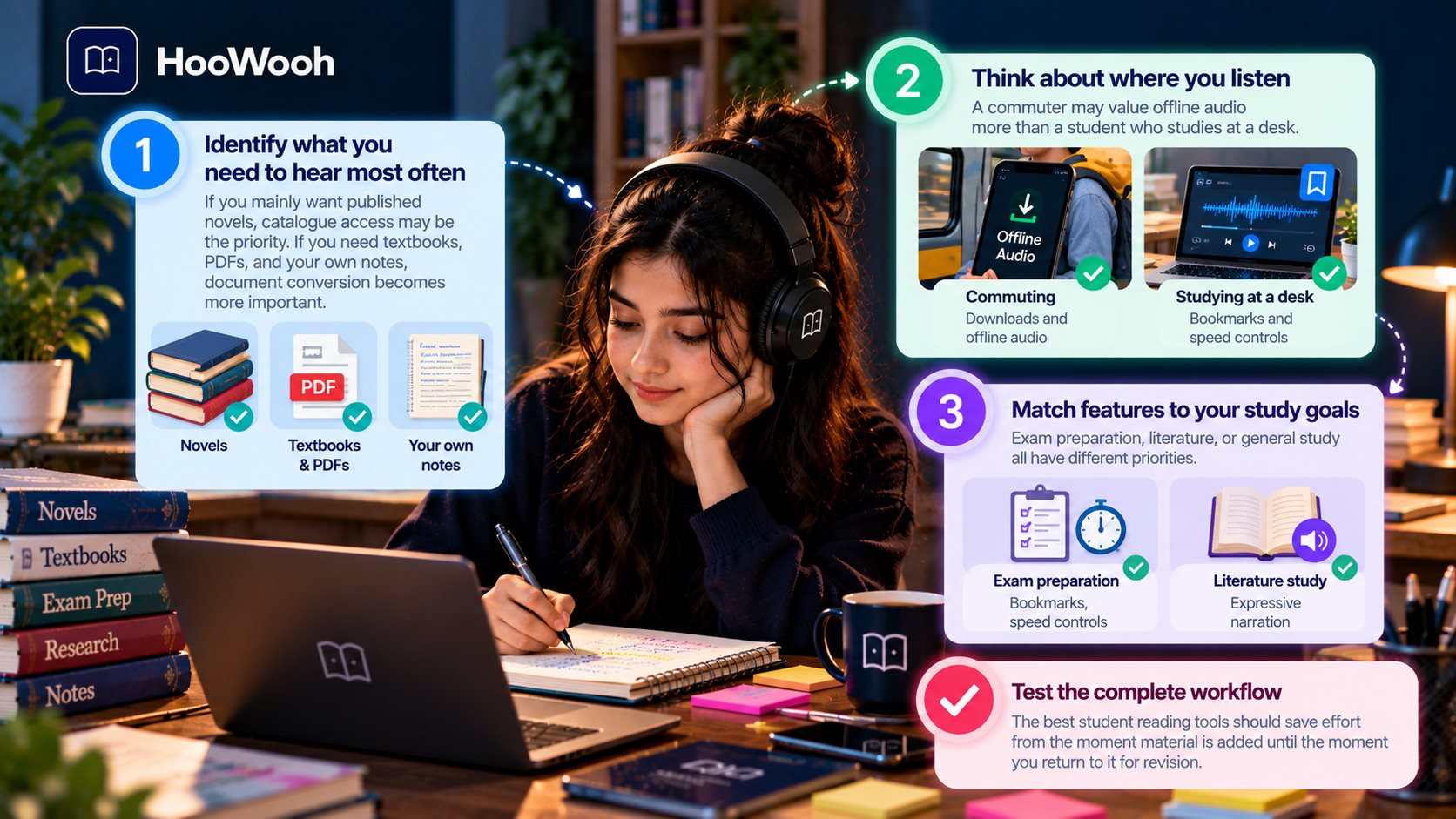
Start by identifying what you need to hear most often. If you mainly want published novels, catalogue access may be the priority. If you need textbooks, PDFs, and your own notes, document conversion becomes more important.
Next, think about where you listen. A commuter may value offline audio more than a student who studies at a desk. Someone preparing for exams may care more about bookmarks and speed controls. A literature student may prefer expressive narration.
Finally, test the complete workflow. The best student reading tools should save effort from the moment material is added until the moment you return to it for revision.
How Hoowooh Fits a Student Audiobook Workflow
Hoowooh is designed to turn supported books and documents into listenable audio. For students, that means course material does not always need an existing audiobook edition before it can become part of an audio learning routine.
Supported digital material can move through a book-to-audio workflow, while scanned printed pages can use OCR before narration. Students can then listen to generated material and use saved audio when offline access is more convenient.
Hoowooh also focuses on expressive AI narration rather than a basic robotic read-aloud experience. That can make long passages more comfortable while still keeping the source material available for close study.
The practical approach is to begin with one chapter, check the reading order and pronunciation, and then expand the workflow only when it genuinely helps the study routine.
Frequently asked questions
What is the best audiobook app for students in 2026? The best app depends on what the student needs to hear. Published books call for a strong audiobook catalogue, while textbooks, PDFs, and personal notes require document conversion. Compare file support, playback speed, navigation, offline access, cost, and voice comfort.
Are there free audiobook apps for students? Yes, but free options may have limits on catalogue access, listening time, conversions, voices, exports, or other features. Test the free option with your actual study material before deciding whether it covers your routine.
Can I turn a PDF textbook into an audiobook? Yes, if the PDF contains readable text or can be processed with OCR. Complex layouts, tables, formulas, and diagrams may still need visual review, so keep the original textbook available while listening.
Can students listen to audiobooks offline? Yes, when the app supports downloads or saved audio. Some services need the internet to generate or obtain the audiobook but allow the finished audio to be played later without a connection.
Can I turn my own study notes into audio? Yes, when the tool accepts the note format or the text can be copied into a supported workflow. Listening to notes can be useful for revision, but important spellings, formulas, and visual details should still be checked on screen.
Choose the Audiobook App That Fits the Way You Study
Best Audiobook Apps for Students 2026 should be judged by the work they help students complete. A huge catalogue is useful for published books, while PDF support, OCR, playback speed, bookmarks, chapter navigation, and offline audio may matter more for academic material.
Hoowooh gives students a way to turn supported books and documents into audio when an existing audiobook is not available. Start with one real piece of study material, test how it sounds and navigates, and build an audio routine only around the features that make learning easier to manage.