
If you want to know How to Clone Your Voice Safely, start with consent, privacy, and a clean recording. A good voice clone is not only about sounding realistic. You should know how your audio is handled, test the result carefully, protect access, and use the cloned voice only for purposes you understand and control.
What Does It Mean to Clone Your Voice?
AI voice cloning creates a digital voice model from recordings of a real speaker. Once the system learns enough vocal patterns, it can generate new speech that resembles that person's voice. The speaker does not need to record every sentence that the final audio will contain.
A custom AI voice may reflect parts of your accent, rhythm, pitch, pronunciation, and speaking style. However, it is not a perfect copy of you as a person. It does not understand your memories, intentions, or feelings. It predicts speech patterns from the information it has learned.
For audiobook narration, this can be useful because an author or narrator can create long-form speech without recording every chapter manually. The important part is keeping control of whose voice is being used and what happens to the voice data.
Is AI Voice Cloning Safe?
AI voice cloning can be used responsibly, but safety depends on the service, the recording, account security, consent, and how the finished voice is shared. A voice can be personally identifying, so it should not be treated like a random sound effect.
Before uploading anything, read the platform's current privacy and voice policies. Check whether custom voices are private, how recordings are stored, whether deletion is available, and whether other users can access or reuse a voice.
Safety also depends on your own choices. Using your voice for a private audiobook is different from publishing a reusable voice model for strangers. The wider the access, the harder it may be to control how a voice is used.
Before You Clone a Voice: Check Consent First
If you are cloning your own voice, you can decide whether you are comfortable creating the model. If the recording belongs to someone else, get clear permission from that speaker before creating a reusable AI voice.
Having an audio file does not automatically mean you have permission to clone the speaker. A podcast clip, video, voicemail, old interview, or family recording may contain a person's voice without giving you the right to turn it into new speech.
Consent should also match the intended use. Someone may agree to a private family recording but not to public marketing, commercial narration, or an openly shared voice model. Keeping that purpose clear is one of the simplest ways to make voice cloning more responsible.
How to Clone Your Voice Safely Step by Step
A safe workflow begins before the microphone is switched on. Think about where the voice will be used, how long you need it, and whether the service gives you enough control over the recording and model.
Step 1: Choose a Consent-Based Voice Cloning Service
Look for a service that clearly explains custom voices, consent, privacy, and user control. Avoid choosing a platform only because a short demo sounds impressive. The rules around your voice matter just as much as the quality of the generated speech.
Step 2: Check How Your Voice Data Is Handled
Read the current terms and privacy information before uploading your recording. Look for details about storage, access, deletion, model sharing, and whether uploaded audio may be used for purposes beyond generating your voice.
If the policy is unclear, do not assume your voice is private. Voice privacy should be confirmed rather than guessed.
Step 3: Record a Clean Voice Sample
Record in a quiet place with one speaker. Keep your microphone position steady and speak in your normal voice. Background music, television, echo, other people talking, or heavy audio effects can make the sample less useful.
A natural voice sample is usually more valuable than a forced performance. If you want a model that resembles your everyday narration, give the system clear examples of how you actually speak.
Step 4: Complete Voice Verification
Some services use voice verification or another confirmation step before allowing a custom voice to be created. This can help show that the speaker is involved in the process and reduce casual misuse.
Verification methods vary, so follow the platform's instructions rather than trying to work around them. If verification fails, check recording quality and the service's requirements.
Step 5: Create Your Custom AI Voice
Once the sample and verification are accepted, the system can build the custom voice. Give it time to process and avoid judging the result from a single short word. Longer sentences reveal pacing, pronunciation, and rhythm more clearly.
Step 6: Test the Voice With Different Text
Test ordinary narration, dialogue, questions, names, emotional lines, and longer sentences. A voice that sounds convincing in a ten-second demo may become repetitive or unnatural during a full chapter.
Testing also helps you notice accent drift, strange pauses, mispronunciations, or emotion that feels too strong or too flat.
Step 7: Keep the Voice Private Unless You Need to Share It
If the voice is only for your audiobook or personal project, there may be no reason to make it publicly available. Limit access to the people and accounts that actually need it.
Treat login security seriously as well. A private voice model offers less protection if someone else can easily access the account that controls it.
- Use your own voice or get clear permission from the person whose voice will be cloned.
- Record one speaker in a quiet room without music, echo, or overlapping voices.
- Check the platform's privacy, storage, sharing, and deletion options before uploading audio.
- Test the voice with several types of sentences before using it for a long project.
- Keep the custom voice private when public sharing is not needed.
How Much Audio Do You Need to Clone Your Voice?
There is no universal recording length for every voice cloning system. Some models can create a rough result from a short clip, while services designed for higher-quality or long-form narration may ask for much more clean speech.
More audio is not automatically better if the recording is noisy or inconsistent. Ten minutes of clean, natural speech may be more useful to a system than a longer file filled with music, multiple speakers, or changing microphone quality.
For Hoowooh, follow the current custom voice instructions shown in the product rather than relying on a number from another service. Voice requirements can change as models and quality standards improve.
How to Record a Good Voice Sample
Your recording is the foundation of the voice model. Choose a quiet room with soft furnishings if possible, since empty rooms can create noticeable echo. Keep the microphone at a comfortable, steady distance and avoid touching it while speaking.
Speak clearly but naturally. Do not suddenly use a deeper, more dramatic, or overly polished voice unless that is the style you actually want the model to learn. Include normal sentence lengths and enough variation for the system to hear your natural rhythm.
Try to keep recording conditions consistent. Switching between a phone microphone, laptop microphone, and studio microphone in one dataset can create unnecessary variation.
Voice Cloning vs Text-to-Speech vs Voice-to-Voice
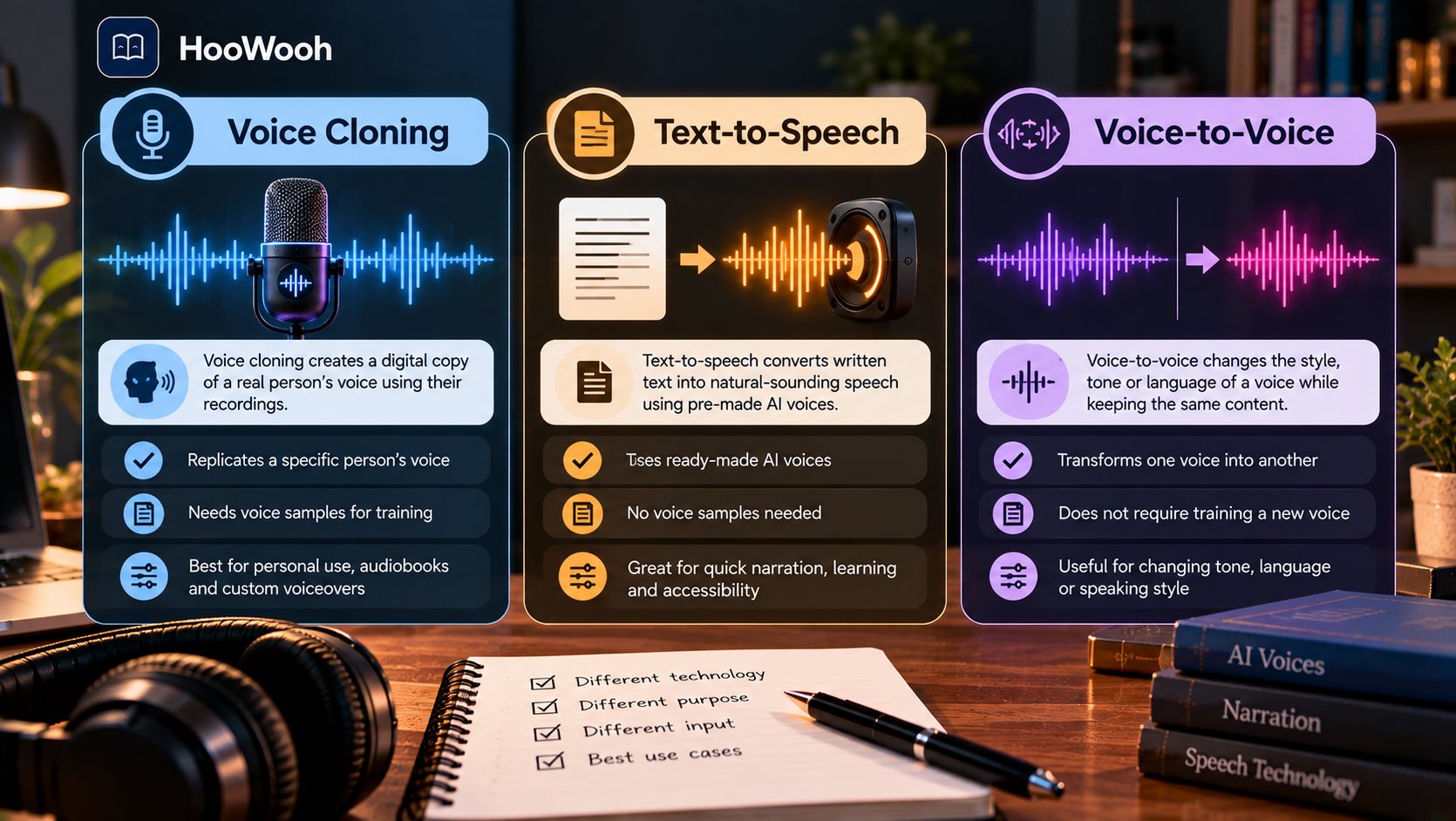
These terms are related, but they are not identical. Voice cloning is about creating a reusable vocal identity from a speaker. Text-to-speech takes written text and turns it into spoken audio using a selected voice.
For audiobook narration, text-to-speech with a custom voice is often the easier concept to understand: the book provides the text, while the voice model provides the vocal identity.
Why Doesn't My AI Voice Sound Exactly Like Me?
A cloned voice can be recognisable without matching every detail of your real speech. Recording quality, sample variety, model design, unfamiliar words, emotional delivery, and accent handling can all affect the result.
If the sample contains only calm speech, the model may have less information about how you sound when excited or serious. If the recording is muffled, the generated voice may also lose some clarity.
Do not try to fix every problem by adding more audio immediately. First identify the issue. A pronunciation problem, noisy recording, and unnatural pacing are different problems and may need different solutions.
Can AI Preserve Your Accent, Emotion and Speaking Style?
A good custom voice may preserve recognisable parts of your accent and speaking rhythm, but results can vary. Certain names, languages, technical terms, or unfamiliar sound patterns may cause pronunciation to drift.
Emotion is also more complex than vocal identity. You can still sound like yourself when you are happy, tired, angry, nervous, or whispering. A voice model needs enough flexibility to change delivery while keeping the speaker recognisable.
For long-form AI narration, consistency matters. An audiobook voice should not suddenly sound like a different person when the mood of the chapter changes.
What Happens to Your Voice Recording After Upload?
This is one of the most important questions to ask before using any voice cloning service. Your recording may be needed to create the model, but you should understand what happens after that step.
Check whether the original audio remains stored, whether the voice model stays linked to your account, and what options exist for deletion. Also check whether voices are private by default or can be published to a shared library.
Do not rely on assumptions based on another AI platform. Privacy practices can differ from one service to another, and they can change over time.
Why Voice Verification Matters
Voice verification can add friction to setup, but that friction can serve a useful purpose. A cloning service should have safeguards that make it harder for a random user to upload another person's voice and immediately create unrestricted synthetic speech.
Verification is not a perfect guarantee against misuse. It is one part of a wider safety process that can include consent rules, access controls, moderation, and account security.
If a service asks you to read a specific phrase or complete a verification step, follow the process honestly. Trying to bypass it weakens the protections designed for speakers.
Can Someone Clone Your Voice Without Permission?
Modern voice cloning technology can create convincing results from recorded speech, which is why public audio should be treated thoughtfully. Someone may attempt to misuse clips taken from videos, calls, interviews, or social media.
Be especially careful with unexpected calls or messages that use a familiar voice to create urgency. A convincing voice alone should not be treated as proof of identity.
- Use strong, unique account credentials and enable extra account protection when available.
- Do not publish raw voice samples or reusable voice models unless there is a clear reason.
- Review who can access a shared project before adding your custom voice.
- Remove old voice models or recordings when you no longer need them and the service provides deletion controls.
- Verify unusual financial or urgent requests through another trusted communication method.
How to Test Your Cloned Voice Before Narrating a Whole Book
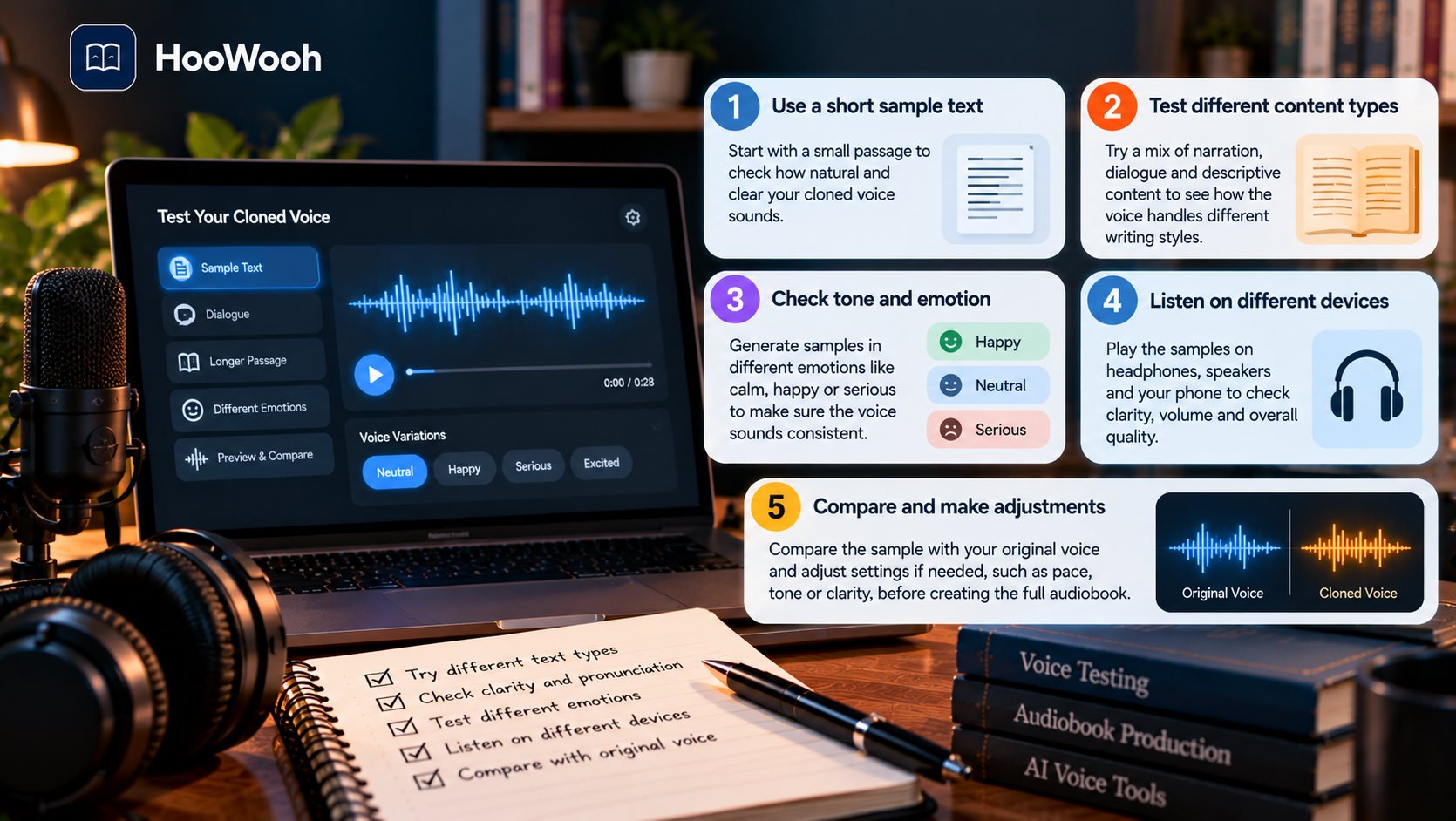
Do not generate an entire audiobook after listening to one impressive sentence. A book can contain hours of narration, dialogue, questions, names, emotional scenes, and unusual vocabulary. Test the voice against the kinds of text it will actually need to read.
Start with a normal paragraph from the book. Then test dialogue, a high-emotion scene, proper names, long sentences, and difficult words. Listen for consistency rather than only similarity.
Ask whether you could comfortably hear this voice for several hours. A natural AI voice should remain clear and stable without repetitive rhythm becoming distracting.
How to Clone Your Voice for Audiobook Narration
Cloning your voice for an audiobook can save you from manually recording every page while still giving the narration a personal vocal identity. Authors may use it for their own work, while families or creators may use authorised voices for private listening projects.
How Hoowooh Supports Custom AI Voices
Hoowooh is built around turning supported books and documents into audiobook experiences. Custom voices can give authors and authorised speakers another way to personalise narration without recording every chapter line by line.
Hoowooh also focuses on audiobook narration rather than treating a cloned voice as a novelty. That makes testing especially important because the voice needs to remain comfortable, understandable, and consistent across long-form content.
A Simple Safety Check Before You Generate Audio
Before using a custom voice in a real project, stop for one final check. A few minutes spent reviewing access and quality can prevent much larger problems later.
- Confirm that the speaker gave permission for this exact use.
- Confirm that the text or book is yours or authorised for conversion.
- Check that the voice model is private or shared only with the intended people.
- Listen to a varied test before generating long-form audio.
- Know how to remove or stop using the voice if your plans change.
Frequently asked questions
Is it safe to clone my own voice with AI? It can be, provided you understand how the service handles your recording and voice model. Use a reputable consent-based platform, review privacy controls, secure your account, and avoid unnecessary public sharing of the custom voice.
How much audio do I need to clone my voice? The amount varies by system. Some tools can produce a basic clone from short audio, while long-form narration services may need more clean speech. Follow the requirements of the platform you are actually using rather than assuming one number applies everywhere.
Can someone clone my voice without my permission? Someone may attempt to misuse publicly available or stolen recordings, which is one reason responsible platforms use consent and verification safeguards. Treat unexpected voice messages carefully and verify sensitive requests through another trusted method.
Why doesn't my cloned voice sound exactly like me? Recording quality, model limitations, sample variety, accent, pronunciation, and emotional range can all affect similarity. Test several kinds of speech and fix the source recording first if it contains noise, echo, or inconsistent sound.
Can I use my cloned voice to narrate an audiobook? Yes, where the service supports custom voice narration and you have the necessary rights to the book or text. Test the voice on long passages, dialogue, names, and emotional sections before generating the full audiobook.
Conclusion
Learning How to Clone Your Voice Safely means thinking beyond whether the result sounds realistic. Start with consent, choose a service with clear privacy controls, record clean audio, complete verification honestly, test the voice carefully, and limit access to your voice data and model.
For audiobook narration, a custom voice should stay clear and consistent across long listening sessions. Hoowooh gives creators a way to explore personalised AI narration while keeping consent and responsible voice use at the centre. Prepare your voice carefully, review the result, and turn authorised content into audio you can feel confident using.